Bloom Watercolor Floral Clipart: A Practical Guide to Quality and Usage
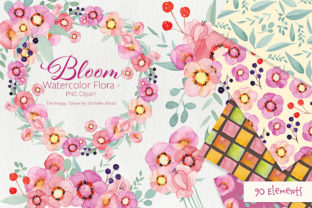
When sourcing digital assets for creative projects, the difference between a polished final product and an amateurish result often lies in the technical specifications of the source files. Bloom Watercolor Floral Clipart represents a comprehensive collection designed to bridge the gap between artistic expression and professional utility. This asset pack is not merely a set of pretty pictures; it is a structured toolkit containing 45 individual elements, 17 pre-arranged bouquets, 8 wreaths, seamless patterns, and textures. However, possessing high-quality assets is only half the battle. Many creators, from small business owners to freelance designers, inadvertently compromise their work by misunderstanding resolution requirements, file formats, or layering techniques specific to watercolor media.
Understanding exactly what you are receiving is the first step toward avoiding disappointment. This collection arrives as a single ZIP file containing distinct categories optimized for different uses. The individual elements and bouquets are provided at 3600 x 3600 px with 600 dpi resolution on transparent PNG backgrounds. Conversely, the digital papers are available in both JPEG and PNG formats at 300 dpi. Recognizing why these distinctions matter prevents common workflow bottlenecks that can stall production or degrade print quality.
The Resolution Misconception: Why 600 DPI Matters for Florals
A frequent oversight among beginners and even some seasoned marketers is assuming that all digital art files serve the same purpose regardless of DPI (dots per inch). When working with Bloom Watercolor Floral Clipart, you will notice the individual elements, bouquets, and wreaths are rendered at 600 dpi, while the background papers are at 300 dpi. This is not an inconsistency; it is a deliberate feature for scalability.
Watercolor relies on soft edges, pigment granulation, and subtle color bleeds. If you attempt to scale up a standard 300 dpi floral element for a large-format print like a poster or banner, those delicate details can become pixelated or muddy. The 600 dpi specification allows you to resize individual flowers down significantly without losing the organic texture that defines the watercolor aesthetic. A common mistake is using the background papers for focal points or resizing them beyond 100%, which results in visible artifacts. Always reserve the 600 dpi assets for your primary design elements and use the 300 dpi papers strictly for backdrops or web-based applications where extreme close-up detail is unnecessary.
Navigating Transparent Backgrounds and Layering Errors
Transparency is the defining feature of usable clipart, yet it remains a source of frustration when mismanaged. All floral elements, bouquets, wreaths, and textures in this collection utilize transparent PNG backgrounds. A critical error occurs when users accidentally flatten these layers too early in their design software or save them as JPEGs during intermediate editing steps. Once flattened against a white background, removing that white space again without damaging the semi-transparent watercolor washes is nearly impossible.
To maintain quality, always keep your master files in PSD, AI, or Procreate format with layers intact. Only export to flattened formats for the final deliverable. Furthermore, be mindful of blending modes. Watercolor clipart often looks best when set to "Multiply" or "Overlay" rather than "Normal," especially when layering multiple blooms to create custom arrangements. Using the "Normal" blend mode can sometimes make overlapping petals look opaque and artificial, negating the realistic watercolor effect. Experimenting with opacity and blend modes on the 45 individual elements allows for depth that pre-made bouquets cannot always achieve alone.
Seamless Patterns: Checking Alignment and Color Consistency
The inclusion of 8 digital papers with seamless patterns offers immense value for packaging, scrapbooking, and website backgrounds. However, a practical warning is necessary regarding pattern application. Not all design software handles seamless tiling automatically. Before committing to a full project layout, test the tile alignment. While these files are designed to be seamless at 3600 x 3600 px, scaling the pattern non-proportionally can break the seamlessness and create visible grid lines.
Additionally, consider color consistency across different file types. You receive these patterns in both JPEG and PNG. While visually similar, compression algorithms differ. JPEGs are excellent for RGB web use and smaller file sizes, but they may introduce slight compression artifacts in solid color areas. The PNG versions, though larger in file size, retain perfect edge definition. For professional printing or merchandise where crispness is paramount, prioritize the PNG pattern files. For social media graphics or email newsletters, the JPEG versions are more efficient and load faster without perceptible quality loss.
Evaluating Versatility Beyond Wedding Stationery
There is a tendency to pigeonhole floral clipart exclusively into wedding invitations or greeting cards. While Bloom Watercolor Floral Clipart excels in these areas, limiting its application undervalues the asset. The 8 textures included in this pack are particularly underutilized. These 600 dpi transparent textures are ideal for adding grit, paper grain, or painterly effects to modern branding, product photography overlays, or even UI design backgrounds.
Entrepreneurs and educators should evaluate this collection based on modularity rather than just aesthetics. Can the 17 bouquets be deconstructed? Yes. Can the 45 individual elements be recombined to match a specific seasonal palette? Absolutely. A better approach to evaluating this purchase is to assess whether the individual components offer enough variety to sustain multiple projects. If you only need one specific arrangement, a smaller pack might suffice. But if you require a cohesive ecosystem of assets that share the same brushwork and color grading for a long-term brand identity, the breadth of this collection provides necessary continuity that mixing disparate free resources cannot replicate.
Technical Checklist Before Downloading and Designing
To ensure satisfaction and avoid technical hurdles, run through this practical checklist before integrating Bloom Watercolor Floral Clipart into your workflow:
- Verify Software Compatibility: Ensure your design program supports 3600 x 3600 px images at 600 dpi. Older mobile apps or basic online editors may struggle with files of this density, leading to crashes or forced downsampling.
- Check Color Profiles: These files are RGB. If you are designing for offset printing, confirm your printer’s requirements. You may need to convert to CMYK, which can shift vibrant watercolor hues. Perform a test print before bulk production.
- Assess Storage Needs: High-resolution PNGs with transparency are data-heavy. Ensure you have adequate cloud or local storage, especially since you are receiving over 80 high-res assets plus patterns.
- Review Licensing Terms: Understand the distinction between personal and commercial use. Just because a file is high-quality does not mean it is cleared for resale as standalone digital products or physical merchandise without modification.
- Test Transparency Handling: Open a sample element immediately after unzipping to verify the alpha channel is clean. Occasionally, zip extraction errors can corrupt transparency data, and catching this early saves time.
By approaching Bloom Watercolor Floral Clipart with technical awareness rather than just aesthetic appreciation, you transform a simple download into a reliable professional resource. The key to maximizing this collection lies in respecting the resolution hierarchy, preserving transparency throughout your workflow, and leveraging the modular nature of the individual elements alongside the convenience of pre-made arrangements. Avoiding common pitfalls regarding file formats and scaling ensures that the organic beauty of watercolor translates perfectly from screen to final product, whether that product is a digital blog header or a tangible printed package.